


STUART SCUBA · UNDERWATER PHOTO & VIDEO · STUART, FLORIDA
Underwater Phone Housings for Scuba Diving
Oceanic+ Dive Housing vs. SeaLife SportDiver Ultra vs. SportDiver S
Bring home a picture of the turtle, not just the story about how big it was. Start with the phone you already own, then compare depth ratings, seal checks, and whether you want room to build out a lighting rig.
Which underwater housing should you try first?
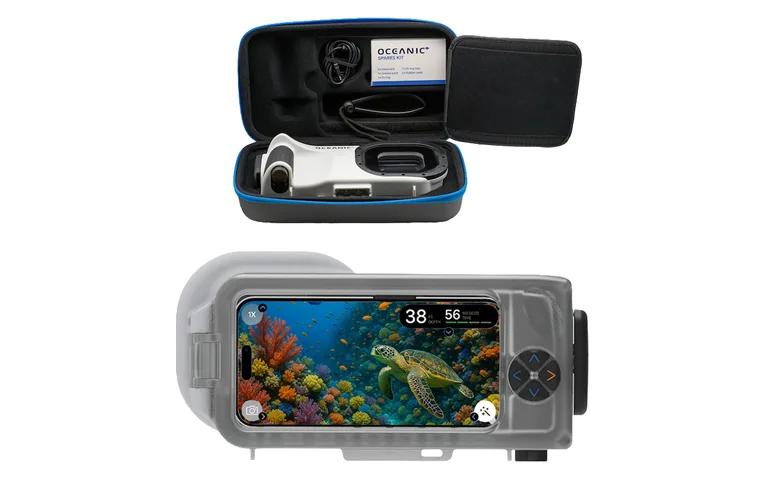
Oceanic+ Dive Housing
Start here if you use a compatible iPhone and want an automatic vacuum pump and the Oceanic+ app’s photo, video and optional dive-data features. Check your exact phone and whether it needs a retrofit kit.
Housing rating: 196 ft / 60 m.
$349.95 sale through the shop Regular $429.95 · Save $80
Ask the shop for the Oceanic+ sale price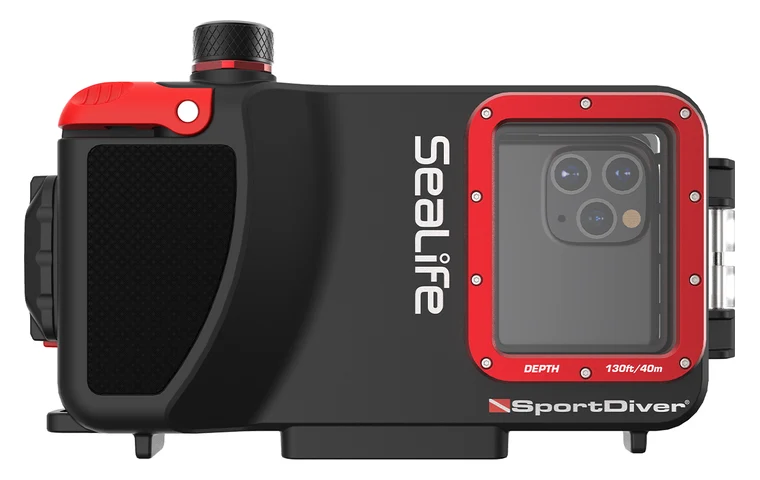
SeaLife SportDiver Ultra
First try for larger supported phones and divers who want options for adding lights and accessories. The housing-only SL405 includes a color filter and fitted travel case.
Housing rating: 130 ft / 40 m.
$349.95 for the housing.
Ask about SportDiver Ultra availability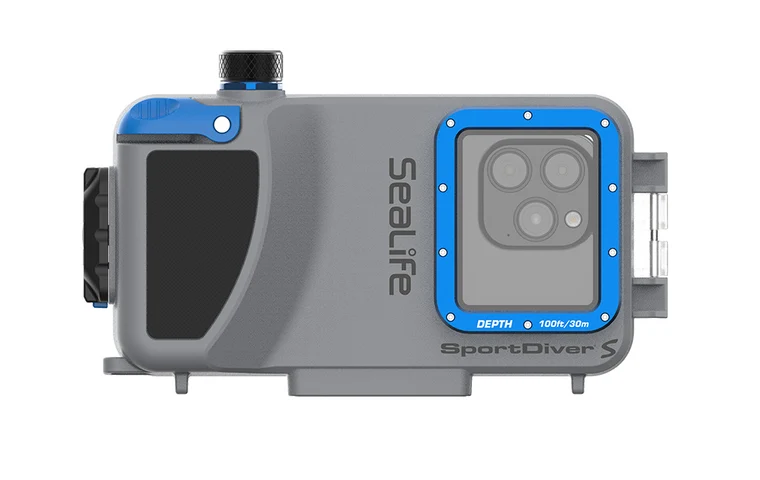
SeaLife SportDiver S
A lighter choice for compatible phones and shallow dives within its rating. It comes with the manual vacuum pump and a soft pouch. A color filter is not included.
Housing rating: 100 ft / 30 m.
$249.95 for the housing.
Ask about SportDiver S availabilityOceanic+ vs. SportDiver Ultra vs. SportDiver S
An underwater housing seals your phone behind a clear lens port. Physical buttons communicate with the compatible camera app, so you can shoot without tapping the screen. A vacuum check tests for an air leak before entry; a moisture alert detects water after it reaches the sensor. Neither replaces clean seals or the manufacturer’s checks.
Manufacturer housing specifications. Rated depth is for the housing, not your dive.
Phone and app
- Oceanic+
- Compatible iPhones; Oceanic+ app
- SeaLife SportDiver Ultra
- Compatible iPhones and Android phones; SportDiver app
- SeaLife SportDiver S
- Compatible iPhones and Android phones; SportDiver app
Manufacturer housing rating
- Oceanic+
- 196 ft / 60 m
- SeaLife SportDiver Ultra
- 130 ft / 40 m
- SeaLife SportDiver S
- 100 ft / 30 m
Pre-dive seal test
- Oceanic+
- Built-in automatic vacuum pump
- SeaLife SportDiver Ultra
- Included manual vacuum pump
- SeaLife SportDiver S
- Included manual vacuum pump
Housing power
- Oceanic+
- USB-C rechargeable housing battery
- SeaLife SportDiver Ultra
- Two AAA batteries
- SeaLife SportDiver S
- Two AAA batteries
Color and setup
- Oceanic+
- In-app color correction; compatible modes and lenses depend on phone
- SeaLife SportDiver Ultra
- Removable filter included; seven 1/4-20 mounting points; larger phone compartment
- SeaLife SportDiver S
- Filter not included; three 1/4-20 mounting points; smaller body
Price and availability
- Oceanic+
- $349.95 sale through the shop Regular $429.95 · Save $80
Get the Oceanic+ sale price through the shop
- SeaLife SportDiver Ultra
- $349.95 for the housing.
Check availability or ask about a light bundle
- SeaLife SportDiver S
- $249.95 for the housing.
Check SportDiver S availability
Bring the actual phone. The camera bump, side buttons, lens layout and operating system all matter. Take off the everyday case and check the exact model with us. We can also compare housings, pumps, replacement seals, trays and lighting so you know what comes in the box and what doesn’t.
How to set up a dive housing before you get wet
- Do a dry run at home. Install and test the compatible app, pair the housing, check storage and charge both devices (or fit fresh batteries). Practice switching between stills and video with the buttons.
- Set up on a clean, dry surface. Follow the exact model manual. Inspect the main O-ring, sealing surfaces and vacuum-port seal. Salt grains, hair and sand have no business being in there. Use only the lubricant the maker specifies, as directed; grease does not fix a damaged seal.
- Fit and check the phone. Place the supports where they hold the phone without pressing side buttons. Check each lens you intend to use for obstruction. Fit the specified desiccant if called for without trapping it against the seal.
- Run the full seal check. Oceanic’s pump is built in; SeaLife’s pump is separate. Follow the app’s complete test and timing for your housing. If a test fails or the housing reports moisture before entry, leave it topside until the cause is resolved.
- Keep your shot plan short. For the first dive, pick a few simple clips and let the controls become familiar. Keep the rig secured without creating a snag hazard, and pay attention to your buddy, conditions and dive plan before you reach for the shutter.
After the dive, keep the case closed while you rinse it in clean fresh water and follow the maker’s rinse procedure. Dry the exterior, especially around the hatch, before releasing the vacuum and opening it. Keep wet hands, spray and sand away from the phone chamber. Inspect the seal before the next dive and pack the case dry and protected.
Better underwater photos with a simple setup
One light is plenty to start
Try a wide-beam video light for nearby subjects, then add a second only if you need more even coverage. Move a light off to the side so suspended particles don’t light up like snow right in front of the lens.
Get closer without crowding
Less water between lens and subject usually makes the picture clearer. Hold a comfortable hover and let the animal come and go. If the only way to get the shot is to chase it or put a hand on the reef, let that one go.
Match your rig to the shot
Start with what’s in the housing. Add a tray for a steadier two-handed grip, then choose a compatible close-up or wide-angle accessory only when you know what you want to photograph. A filter changes the light reaching the lens; it cannot add light that’s missing.
Ready to practice with an instructor? Start with Underwater Photographer Diver, Underwater Video Diver or Advanced Buoyancy Control. For a local outing, look at our Blue Heron Bridge guide and look up what you photographed in the Stuart Scuba Fish ID guide.
Underwater phone housing FAQ
Can I use the same housing when I upgrade my phone?
Possibly. Check the exact new phone, operating system, lens layout and any manufacturer-specified fitting parts. An old phone that fits does not tell you whether the new camera bump will clear the housing.
Do I need an Apple Watch Ultra with the Oceanic+ housing?
No. You need a supported iPhone and the Oceanic+ app. Check which app features require a paid plan. Use the dive instruments your training and dive plan require; the camera is not a substitute for them.
Are the two SeaLife housings just different sizes?
No. The Ultra fits a wider range of large compatible phones, is rated to 130 ft / 40 m, includes a color filter and has seven mounting points. The SportDiver S is rated to 100 ft / 30 m, has three mounts, and comes without a filter.
Can I take the housing to its full depth rating?
A rating is the manufacturer’s limit for the housing. Your training, experience, gas, team, conditions and dive plan set your diving limits. Check the rating of each accessory on the rig as well.
What if the housing alarms underwater?
Keep control of the dive and follow the manufacturer’s instructions and your training. Do not open the housing underwater or hurry the ascent to save a phone. Once topside, check the exact alarm and follow the manual before using the housing again.
Will the warranty pay for my phone if the housing floods?
Do not assume it will. Check the written warranty for the exact housing and any separate phone coverage before use. Keep the receipt and ask us which consumables and replacement parts are available.
Can I pick up my housing in Stuart?
Yes, online purchases are available for in-store pickup. For a SeaLife model or accessory you don’t see listed online, contact the shop to check availability and what’s included before coming in.
Bring your phone and try the controls
Tell us the exact phone model, where you’re diving and what you want to shoot. We’ll help check the fit and compare housings at Stuart Scuba, 3317 SE Federal Hwy, Stuart, Florida.